
SwitchBot Curtain 2 Review: Turn Your Existing Curtains Into a Smart Home Device
If you’ve ever wanted “smart curtains” without paying for an entirely new motorized curtain track, the SwitchBot Curtain 2 is the product that started that whole category — and it’s still SwitchBot’s top seller in their Hot Sales collection. Instead of replacing your curtain rail, this little robot clips onto the rail you already have and drives your existing curtains open and closed. After going through SwitchBot’s own spec pages and compatibility guides, here’s what it actually does well and where it has real limits. You can see current pricing and bundle options directly at SwitchBot.
Quick Overview
SwitchBot Curtain 2 is a retrofit curtain robot — a compact, palm-sized motor that clips onto your existing curtain rail (not a curtain rod replacement kit) and physically pulls your curtains open or closed. SwitchBot calls it the “World’s First Retrofit Smart Curtain Solution,” and it’s picked up Good Design and IDEA design awards along the way. It currently has 497 reviews on SwitchBot’s own site, and it’s listed first in their Hot Sales collection, which is a reasonable proxy for it being their best-selling automation device.
Key Features
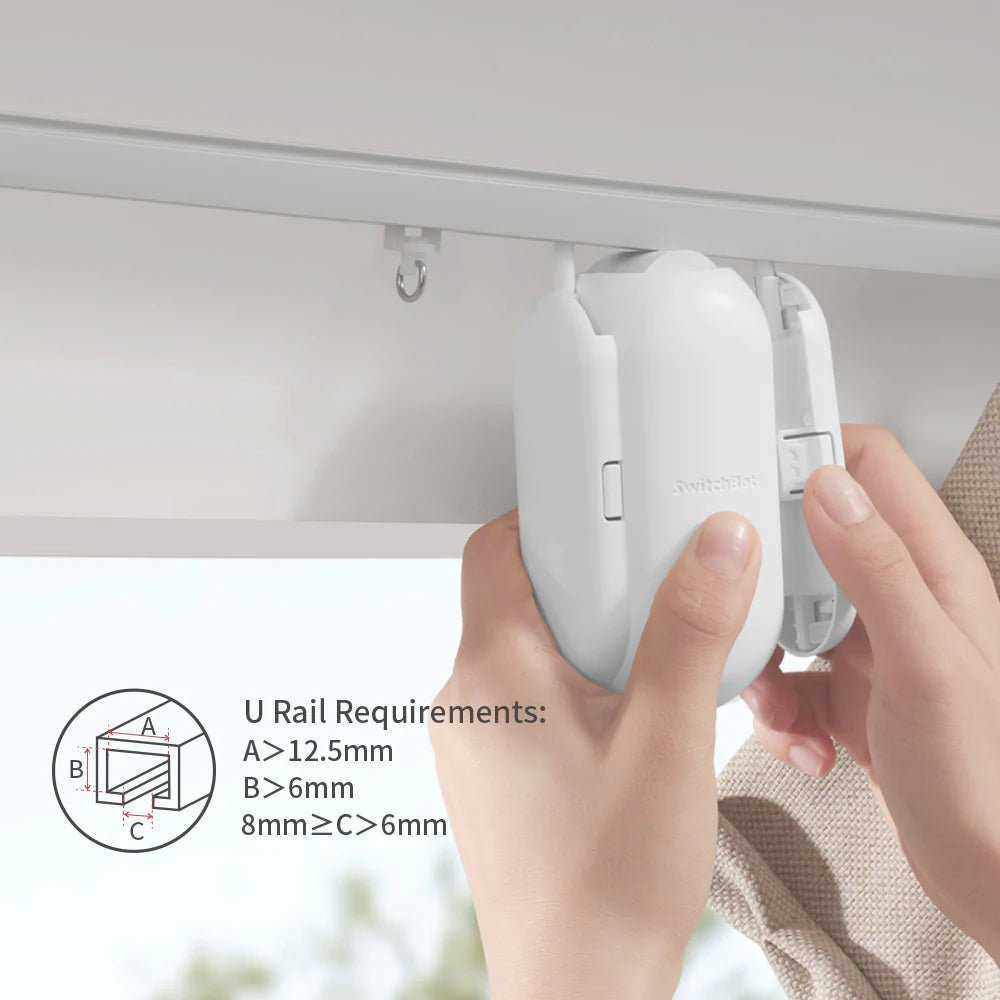
30-second, tool-free installation. SwitchBot’s own claim is that its “award-winning mechanical design” lets you clip it onto a rail in about 30 seconds with no drilling, no tools, and no rewiring your existing curtain setup.
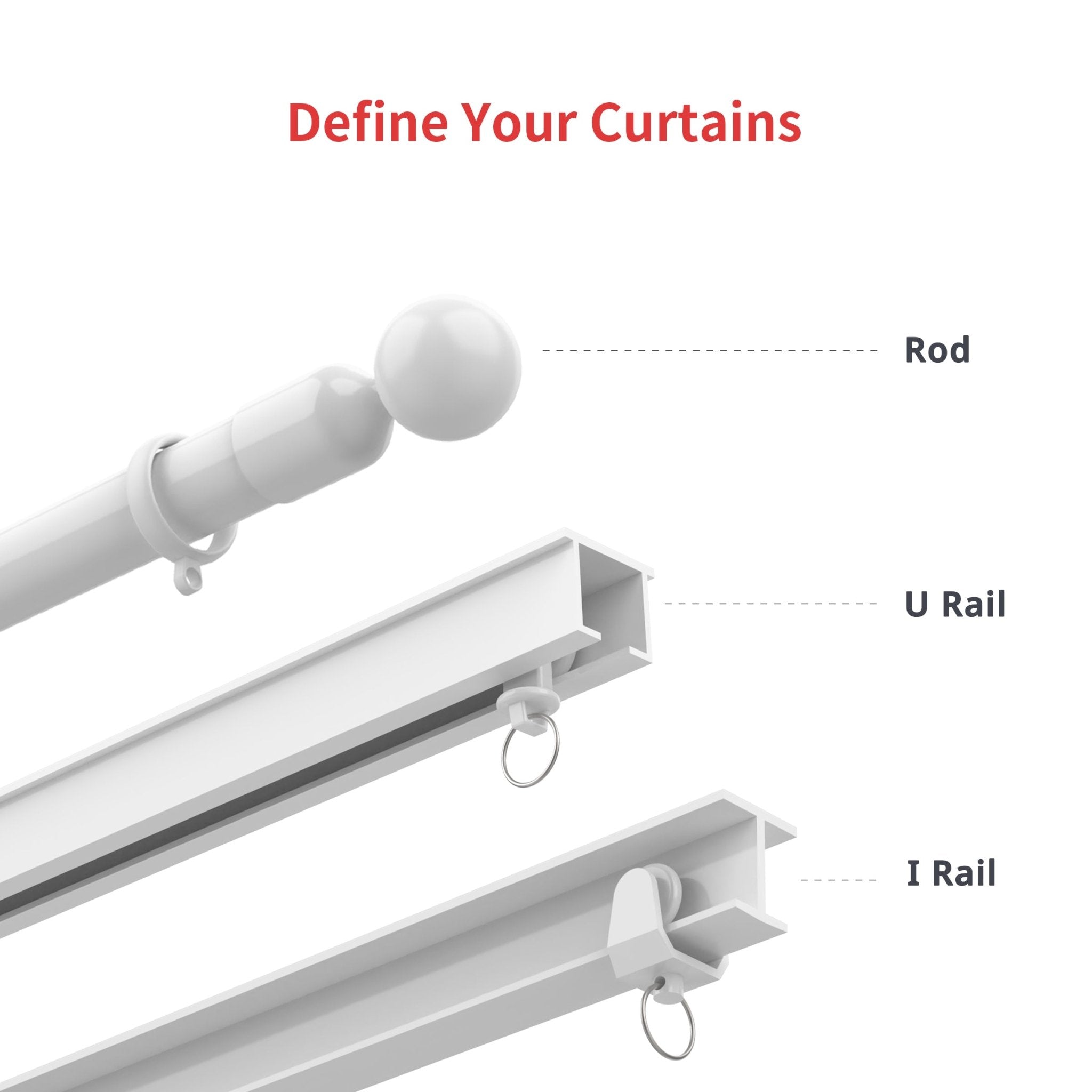
Fits U-rail, I-rail, and rod-style curtains. SwitchBot sells rail-specific hardware, so you pick the right variant for your setup: U Rail, I Rail, or Rod. For rods, it supports Grommet, Ring Top, Back Tab, and Tab Top styles — but SwitchBot is explicit that Rod Pocket curtain designs are not currently supported, so it’s worth checking your own curtain style against their compatibility guide before ordering.
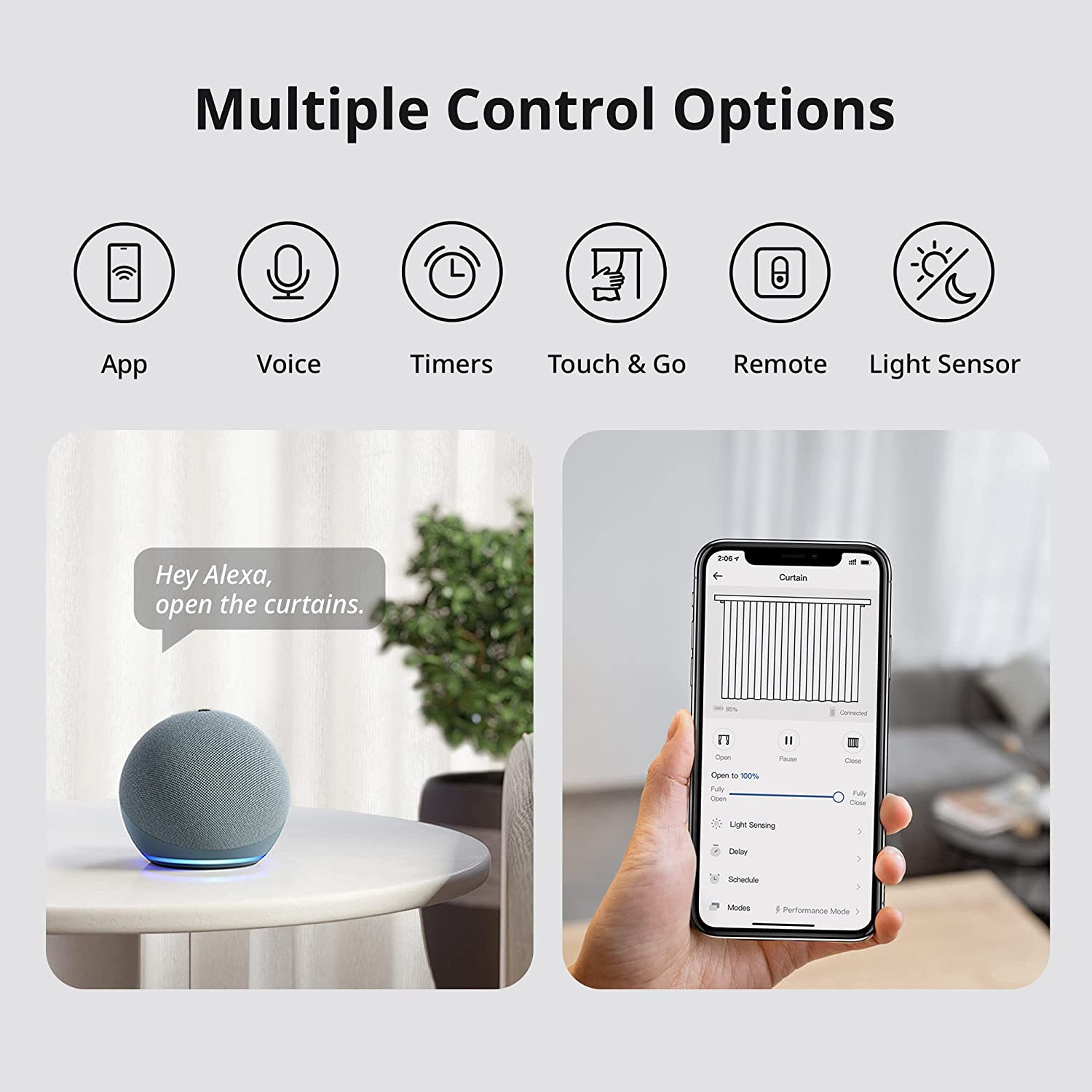
Multiple ways to control it. SwitchBot lists six control methods for the Curtain 2: the SwitchBot app, voice commands, timers/schedules, “Touch & Go” (manually tug the curtain and the motor senses the pull and finishes the job), a physical SwitchBot Remote, and a light sensor mode that can react to how bright the room is.
Real voice assistant support — with a catch. Paired with a SwitchBot Hub Mini, you can control the Curtain 2 with Alexa, Google Assistant, or Siri (“Hey Alexa, draw the curtains”), and also control it remotely when you’re away from home. Without the Hub Mini, you’re limited to Bluetooth-range app control and the physical remote — that’s an extra purchase worth factoring in if voice control or remote access is the reason you want this.
Rechargeable battery rated for up to 8 months. SwitchBot states the built-in rechargeable battery lasts up to 8 months per charge under typical use, and there’s an optional SwitchBot Solar Panel accessory if you’d rather not recharge it manually.
Handles 5-8 kg of curtain. SwitchBot specs the device to push curtains weighing between 5 and 8 kilograms, which covers most standard household curtain panels but is worth checking against heavier blackout or double-layered curtains.
Double-sided curtain support. If you have curtains that open from the center (two panels meeting in the middle), SwitchBot sells a Starter Pack with two units so both sides move together.
Who It’s For
This is a strong fit for renters and homeowners who want smart-home automation without replacing hardware they already have:
Renters who can’t install a new motorized curtain track but can clip a small device onto an existing rail and remove it later with no trace.
Alexa/Google Home/Siri households who already have a smart speaker and want “open the curtains” added to their routine — as long as you’re willing to add a Hub Mini to the cart.
Anyone who wants light control on autopilot — using the light sensor mode or a sunrise/sunset-style schedule instead of manually pulling curtains every morning and night.
Not a fit for households with Rod Pocket-style curtains (unsupported), curtains heavier than about 8kg, or people who want zero additional purchases — the full voice-and-remote-access experience requires the separate Hub Mini.
Pricing
SwitchBot Curtain 2 is listed at $89.00 for a Single Pack (I Rail, White), with Starter Pack (2 units, for double-sided curtains) and Home Pack (4 units, for multiple windows) bundles also available. SwitchBot frequently runs sitewide promotions — at the time of writing there’s an active discount code on their site — so it’s worth checking the SwitchBot Curtain 2 product page directly for the current price before you buy, since promo pricing changes often. Every order also comes with a 30-day money-back guarantee and a 1-year warranty.
Remember to budget separately for a SwitchBot Hub Mini (sold separately, roughly $39) if you want voice control or away-from-home access — it’s not bundled into the base Curtain 2 price.
Pros and Cons
Pros: genuinely fast, tool-free installation on an existing rail; works with U-rail, I-rail, and most rod styles; six different control methods including a physical Touch & Go gesture; rechargeable battery rated for months of use with an optional solar top-up; double-sided curtain support via bundle; 30-day returns and 1-year warranty; award-winning design that’s been refined across two generations.
Cons: voice control and remote access both require buying a separate Hub Mini; Rod Pocket curtains aren’t supported at all; the 5-8kg weight limit rules out some heavier blackout curtains; and because it clips onto your existing rail rather than replacing it, how well it performs still depends partly on the condition and smoothness of your current curtain track.
FAQ
Does it work with my curtain rail? SwitchBot supports U Rail, I Rail, and several Rod styles (Grommet, Ring Top, Back Tab, Tab Top) — but not Rod Pocket curtains. Check SwitchBot’s compatibility page and measure your rail dimensions before ordering the right variant.
Do I need to buy anything else to use Alexa or Google Assistant? Yes — voice control requires pairing the Curtain 2 with a SwitchBot Hub Mini, which is sold separately.
How long does the battery last? SwitchBot rates the built-in rechargeable battery for up to 8 months per charge under typical use, with an optional solar panel accessory for continuous charging.
Can I still open the curtains by hand? Yes — SwitchBot’s “Touch & Go” feature detects when you manually pull the curtain and the motor takes over to finish opening or closing it.
What if I have curtains that meet in the middle? Buy the Starter Pack (2 units) so both sides of a double-sided curtain move together.
Bottom Line
SwitchBot Curtain 2 earns its spot as SwitchBot’s best-selling automation device by solving a genuinely common problem — retrofitting smart control onto curtains you already own — with a design that’s fast to install and easy to remove. It’s not a universal fit (Rod Pocket curtains and heavier drapes are out, and full voice control needs an extra Hub Mini purchase), but for U-rail, I-rail, or compatible rod setups, it’s a low-commitment way to add real smart-home automation to a room. If your curtain rail matches SwitchBot’s compatibility list, it’s worth checking the current price and bundle options on the SwitchBot Curtain 2 page.